Sanctuary Brief Field Notes
Alliance OperationsAlliance Event Reminders by Text: How Sanctuary Brief Keeps Your Team in Sync
A heads-up before the event, the time in your own time zone, and an optional tip to help you arrive ready. Less chasing for leaders. More time together for your team.
You meant to be there. The plan was in alliance chat, but dinner ran late, work pulled you away, or you simply lost track of time. By the time you opened Puzzles & Survival, your team had already started.
Sanctuary Brief’s Alliance Command Center helps close that gap with optional text reminders about 15 minutes before an alliance event. A quick heads-up on your phone gives you time to finish what you’re doing and join your team.
Less watching the clock. More chances to be there for the moments that make an alliance feel like a team.
For members: enjoy your day without losing track
You shouldn’t have to keep checking chat to remember an event. A reminder brings the event name, start time, and a link to your alliance’s plan straight to your phone. The time is automatically converted to your saved time zone, so there’s no working out what another commander’s “8 PM” means for you.
Some reminders also include an optional event tip chosen by your leader. You get a nudge to show up and a useful pointer for what to do when you arrive.
For leaders: less chasing, more leading
Getting an event on the calendar is only half the job. Getting people there can mean repeating the time in chat and hoping everyone sees it.
Keep your eligible events up to date in the Command Center, and Sanctuary Brief sends reminders to members who have turned them on. Choose a helpful event tip to include when it fits. Everyone sees the start in their own saved time zone, and you don’t need to collect phone numbers or send individual texts.
Turn on your reminders
Start in My Sanctuary. Text reminders support US mobile numbers in participating alliances; see Alliance Event Alerts for availability.
- Add your number. Open Edit account preferences, enter your US mobile number with +1, check the optional text-reminder box, and select Save account preferences.
- Confirm it’s yours. Select Send verification code and enter the code we text you. Look for a text confirming you’re signed up.
- Get your heads-up. In My Alliance, open Manage reminders & sharing and turn on text reminders for a nudge about 15 minutes before your alliance’s event.
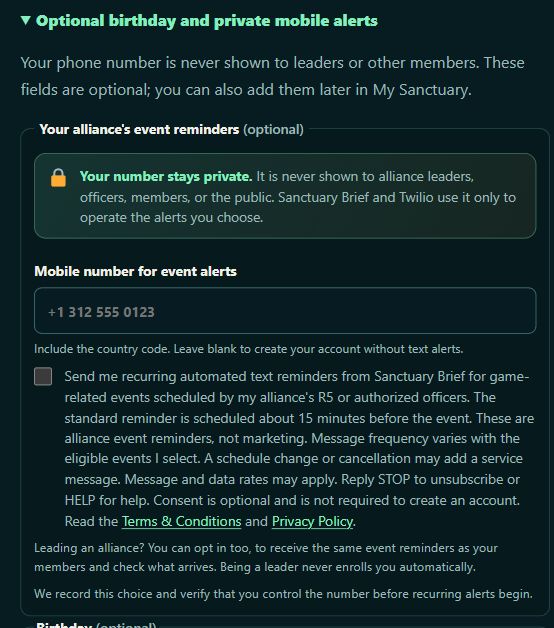
Creating an account? Open Optional birthday and private mobile alerts to add your number. The phone field and text-reminder checkbox appear there. The box starts unchecked; birthdays and texts are separate choices.
A small message at the right moment
The reminder keeps the important details together. Here’s Sonic Decoy with an example alliance and time. This member’s saved time zone is Central:
Sanctuary Brief / CAMP: Sonic Decoy starts in about 15 min at Tue Oct 6, 8:00 PM CDT. Tip: Be ready at the announced Sonic Decoy start time. Follow the rally host’s instructions and launch or join rallies against the Destroyer when the leader gives the call. https://sanctuarybrief.com/alliance-command-center/ Reply STOP to unsubscribe.
Example reminder · fictional alliance and time
In this example, 8 PM Central is 9 PM Eastern. Your reminder shows the start in your saved time zone, so you can skip the mental math.
If the event moves or is canceled after your reminder arrives, a follow-up keeps you informed. Reminder arrival is approximate, so check the Command Center for the latest plan.
Your number stays private. Your choice stays yours.
Leaders, officers, other members, and the public cannot see your phone number. You can use Sanctuary Brief without turning on texts, and joining an alliance never signs you up automatically.
These are event reminders, not marketing. Message frequency depends on your eligible events, and message and data rates may apply. Reply STOP to unsubscribe or HELP for help. To restart after STOP, reply START, then return to My Sanctuary to choose text reminders again and verify your number.
See the SMS Terms and Privacy Policy for details, or contact Support if you need a hand.
Make the most of your reminders
Members: be ready
Keep your time zone up to date and turn on your alliance’s reminders for a heads-up about 15 minutes before events.
Leaders: keep it clear
Confirm event names and times, then choose a useful tip to help your team arrive ready to play.
Be there for your team, ready to play.
Notes from the alliance
Keep it useful and respectful. No personal contacts, private player details, harassment or spam. First comments receive human review. Comments can suggest editorial corrections; they do not establish game facts.
Report a concern to Support with the article link and comment number. Reply-email subscriptions, when offered, are optional and separate from SMS consent.
Comments are closed while the account and moderation experience is being checked. You can still send a correction to Support.